
Case study Medical imaging

One place the fortnight runs from, for 45 staff across six clinics.

GIG Radiology, six clinics across Melbourne's south east, the Mornington Peninsula and Gippsland.

Build time
About three months
Project value
$45,000 to $70,000
Live since
July 2026

GIG Radiology was running six clinics on pen and paper, with the admin side held together in Excel, documents emailed around and no record of who changed what. The work did not change. The way it is carried did. Since the portal went live on 5 July 2026 it has published 1,848 shifts and put 142 fortnightly timesheets through to payroll without one of them being typed into a spreadsheet again.

Staff on the portal
45
Clinics rostered
6
Shifts published
1,848
Timesheets to payroll
142

Figures from the portal, 5 July to 12 September 2026, ten weeks live.

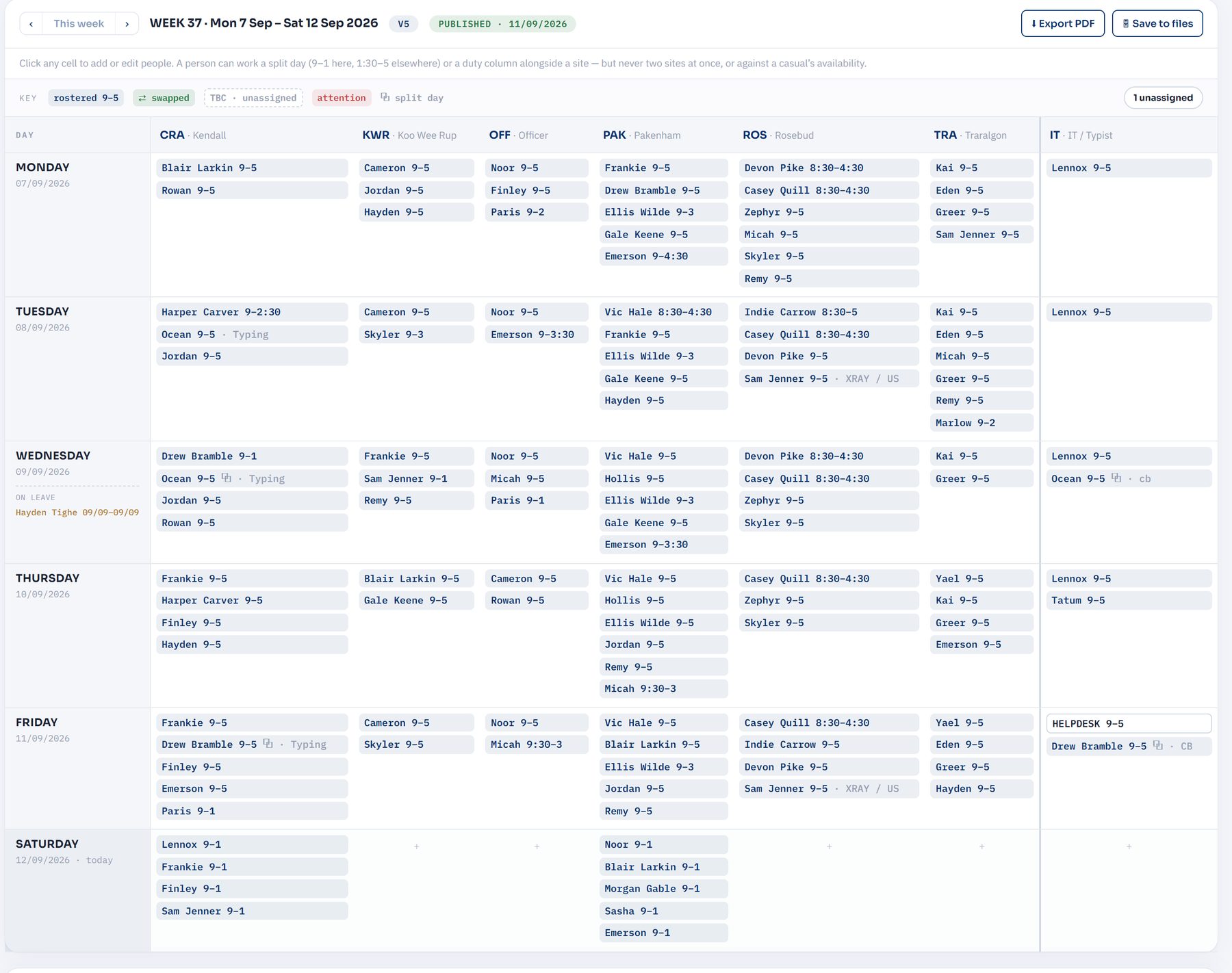
The staff portal roster for one week, laid out as a grid with a column for each of the six clinics and one for the IT and typing team, and a row for each day, every cell listing who is on and their hours
One week, all six clinics and the IT and typing team, published from an uploaded PDF. Split days, swaps and duty codes are marked; anything still unassigned is counted in the corner.

Who they are

GIG Radiology is a medical imaging group with six clinics across Melbourne's south east, the Mornington Peninsula and Gippsland: Cranbourne, Pakenham, Officer, Koo Wee Rup, Rosebud and Traralgon. The IT and typing team that supports all six is rostered alongside them, which makes seven columns on any given week.

Forty five people hold portal accounts: 17 receptionists, 13 radiographers, 8 sonographers, and the managers, typists and IT staff around them. Most of them open it on a phone between patients, and sixteen have installed it as an app so a roster change arrives as a notification rather than an email nobody opens.

How the week used to run

Pen and paper, and Excel for the admin side. The fortnight's roster went out as a document and whoever needed to know whether they were at Rosebud or Traralgon on Thursday went looking through their inbox for the newest version, with no way to be sure it was the newest.

Timesheets came back on paper, then somebody keyed all of them into a spreadsheet: hours, half hour rounding, Saturday overtime, and whatever leave had been approved somewhere else. Sick days and shift swaps were settled by phone call and text, so the answer lived in one person's handset, and there was no record of who had changed what.

None of that was broken, exactly. It worked because people carried it. It just cost hours, and every hand-off was a chance for a number to come out wrong.

What we built

A staff portal built around the way the group already worked, not around a template. The manager still builds the roster the same way; everything downstream of it stopped being manual.

The roster: a PDF goes in, a live schedule comes out

The fortnight's roster is uploaded as it always was. The portal reads it, publishes it as a live schedule, and notifies anyone whose week changed. Staff see their own shifts weeks ahead, put a shift up for swap or fill-in, and the portal refuses a double booking, a second site on the same day, or a shift that lands on a casual who said they were not available. Every version of every week is kept, so there is one answer to which roster is current.
Timesheets that fill themselves in

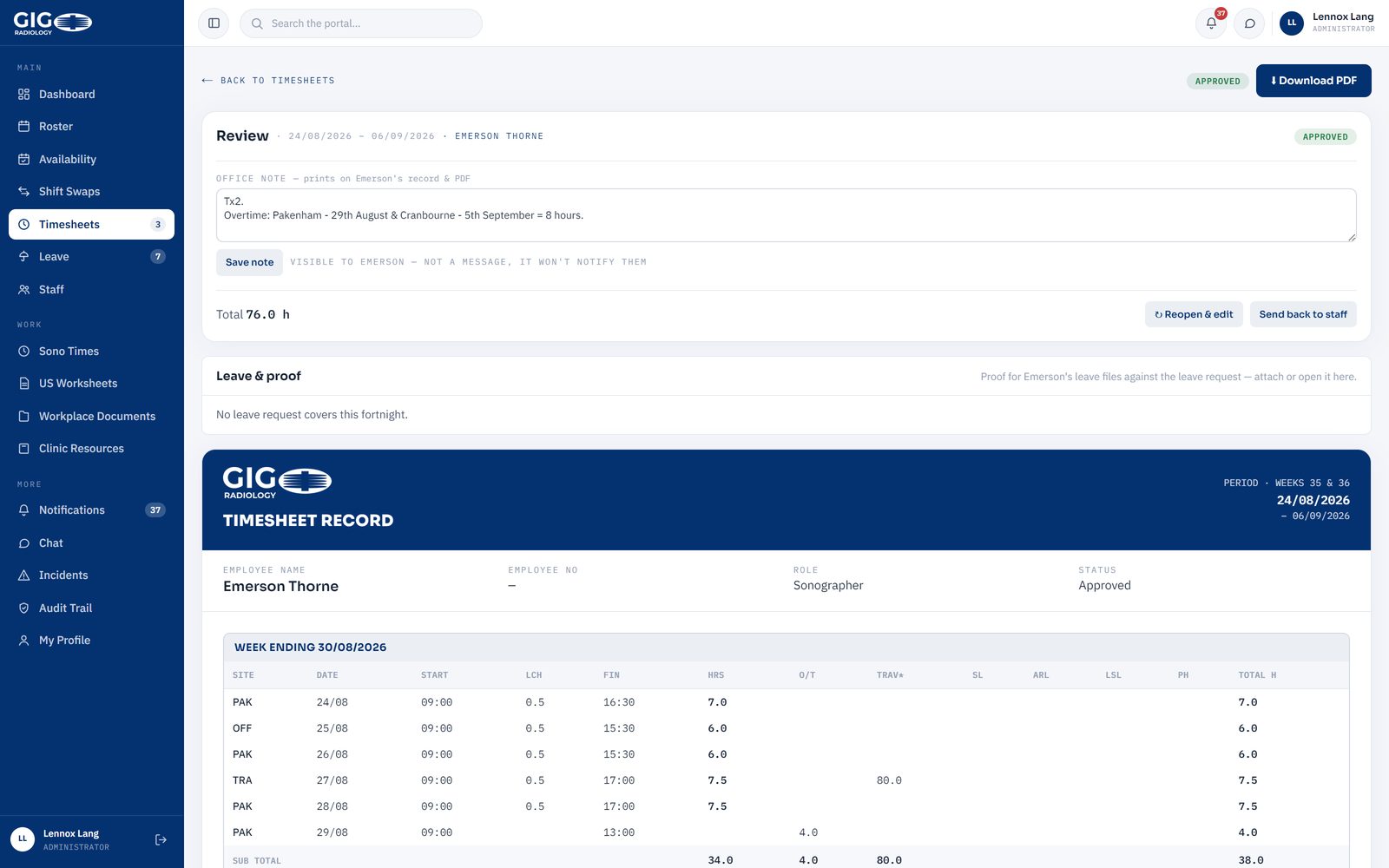
Each fortnight's sheet arrives pre-filled from the roster. Approved leave lands on it without anyone copying it across, and a full-timer's half hour rounding and Saturday overtime are applied by the rules rather than from memory. Staff submit, an administrator approves, and payroll gets one branded export in the exact column layout the pay provider asks for.

An approved fortnightly timesheet in the portal, showing each day's site, start, lunch, finish, hours and overtime, with a running total and an office note about overtime worked
One approved fortnight. Site, hours, overtime and leave columns are the ones payroll already uses, so the export drops straight in.

Leave, with the certificate attached to it

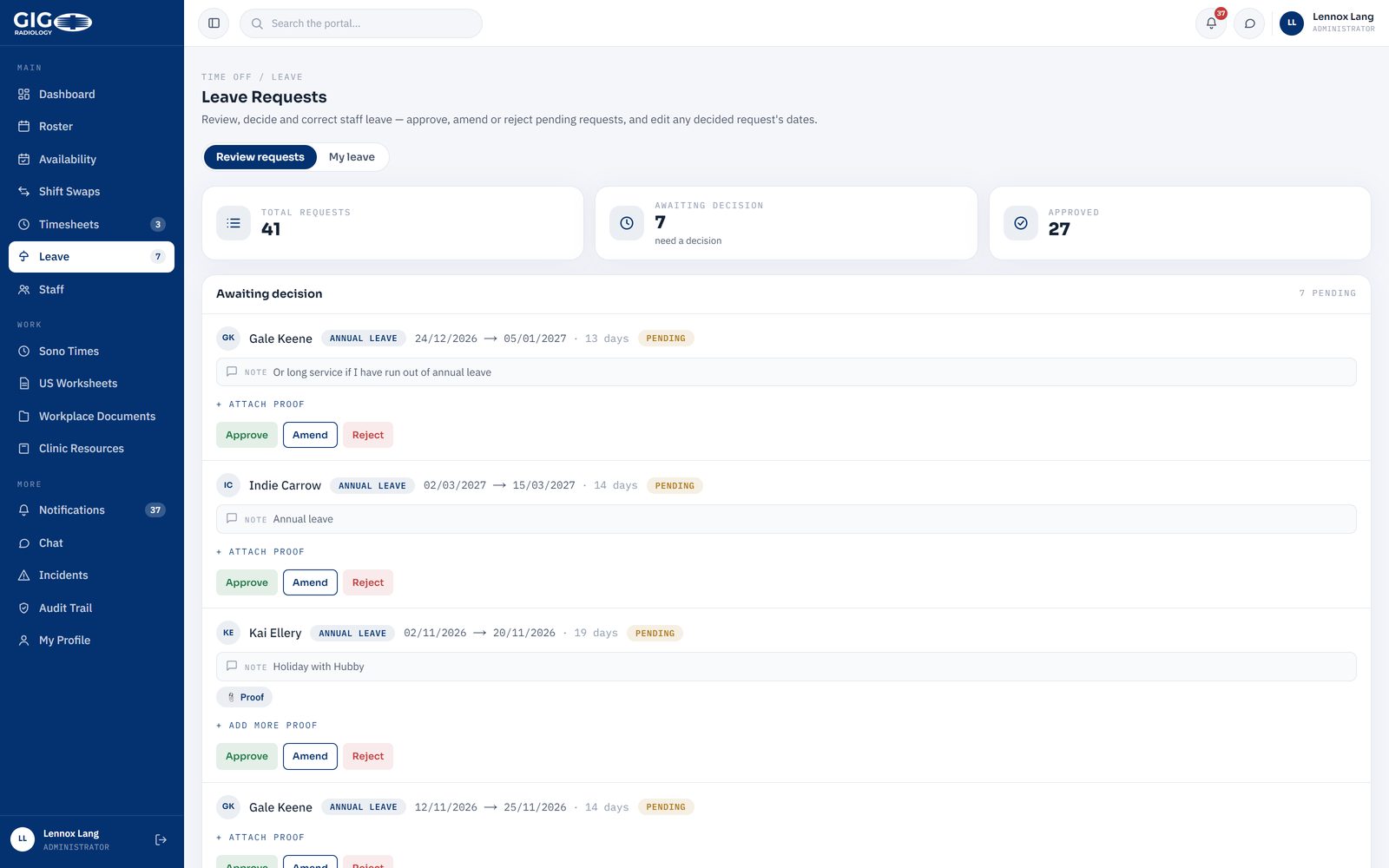
Leave is requested from the leave page or straight off the timesheet, with the medical certificate attached to the request rather than sitting in somebody's email. Managers approve, amend or decline in one queue, and an approval flows onto the timesheet on its own. Forty one requests have gone through it so far.

The leave review queue in the portal, listing requests with dates, day counts, staff notes and approve, amend or reject buttons
The approval queue: 41 requests, 7 waiting on a decision, 27 already approved.

Built for the phone, because that is where it is used

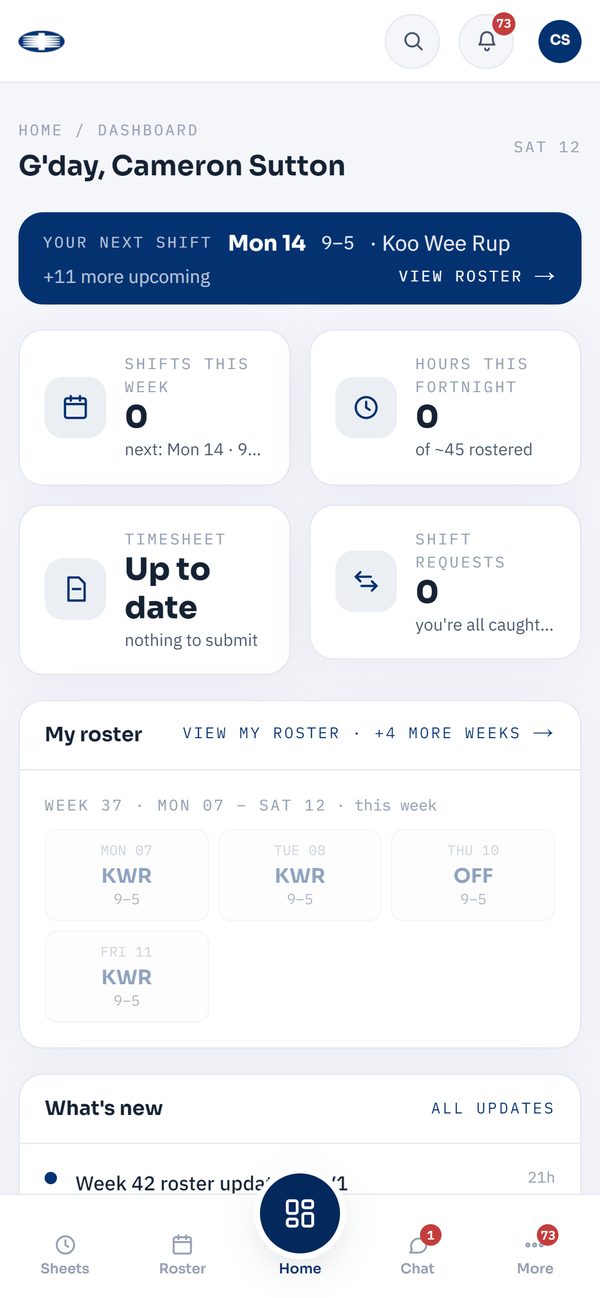
Most of the 45 are not at a desk. The portal is built to be opened one-handed between patients: your next shift at the top, your fortnight's hours, whether your timesheet needs anything. Sixteen staff have it installed as an app and get a push notification when their week changes.

The portal home screen on a phone, showing the next rostered shift, hours for the fortnight and whether a timesheet is outstanding
Your next shift, and anything waiting on you.
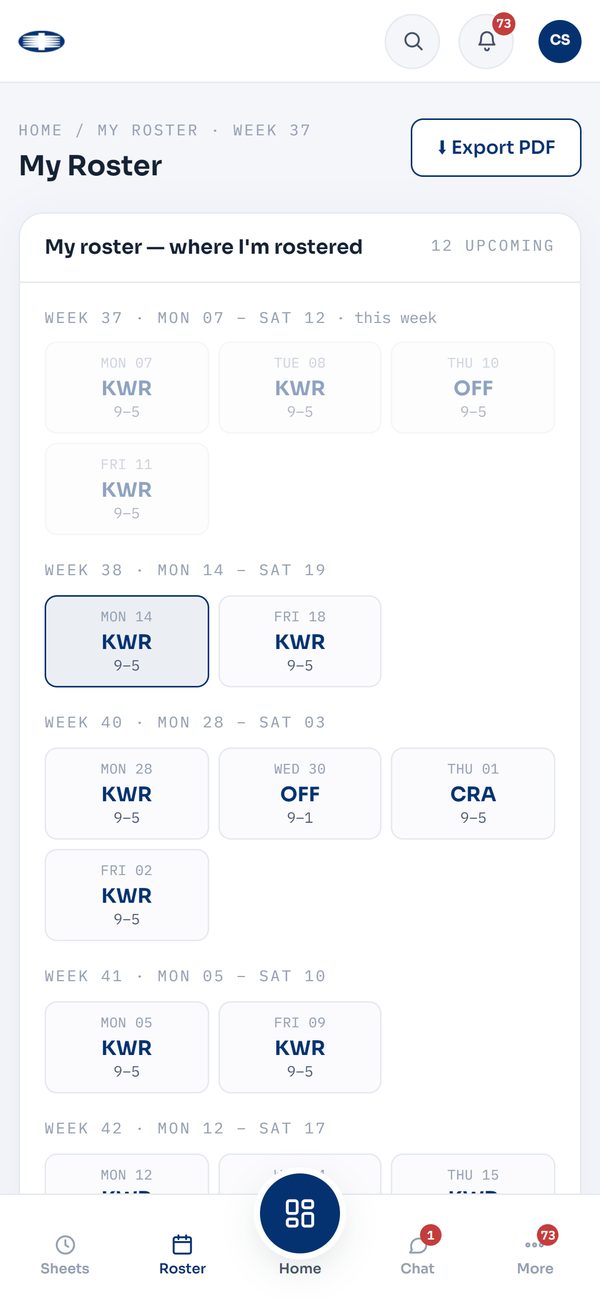
The my roster screen on a phone, listing the staff member's own shifts week by week with site codes and hours
Your own shifts, weeks ahead, exportable as a PDF.

The reference everyone was chasing

Worksheets, clinic resources, workplace policies and the sonographer scan-times matrix live in the portal, with read acknowledgement on the ones that need signing off. There are 94 documents in the libraries. Nobody asks for the latest version any more, because there is only one.

The scan-times matrix is the one that saves the most arguing: a grid of who can do which procedure and how long it is booked for, read straight out of the sheet the group already maintained, kept current in one place and downloadable for the floor.

Who can see what, and a record of what happened

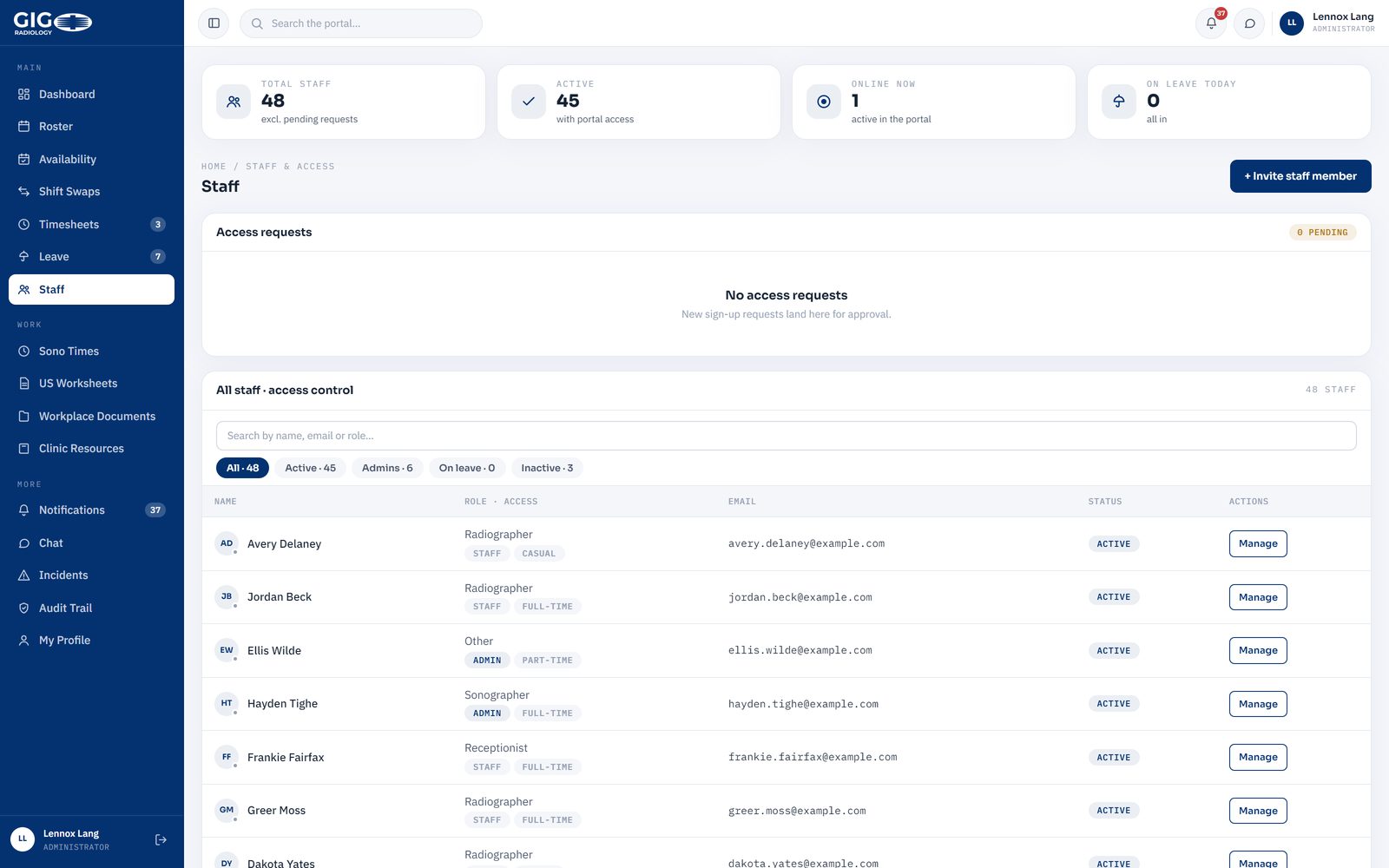
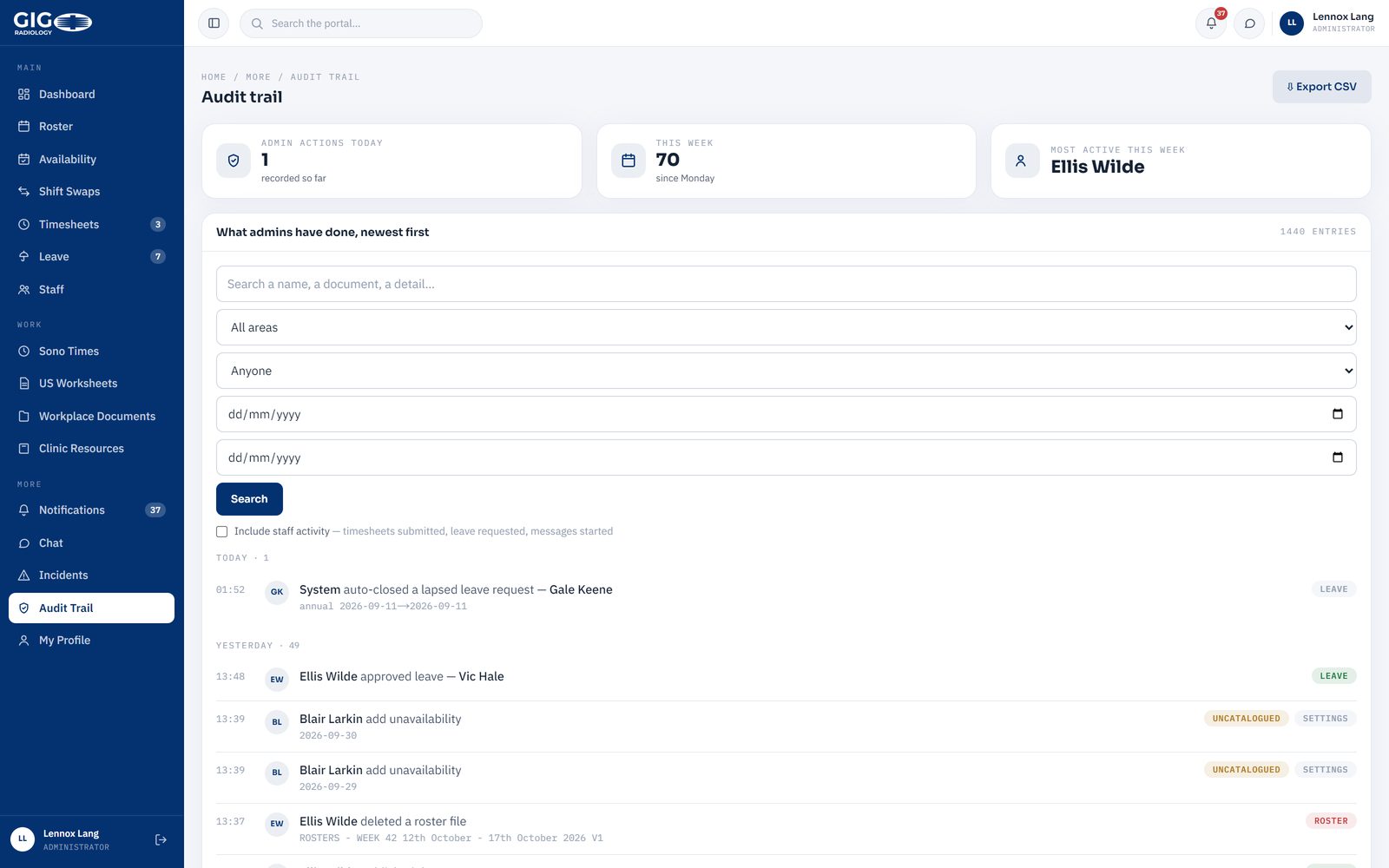
This is a health provider, so access is set per area and per person, and every action is logged: who published a roster, who approved a leave request, who changed a timesheet and when. It is the part nobody asks for in the first meeting and everybody wants by the first audit.

The staff and access screen, listing every staff member with their role, access level, email and status
Every account, its role and its access.
The audit trail screen, listing portal actions in reverse order with who did them and when
Every action, newest first, filterable by person and date.

Ten weeks in

The portal went live on 5 July 2026. Same roster, same fortnight, same people: faster to run, easier to use on the floor, and accurate because the numbers are calculated rather than copied. These are counts out of the system, not estimates.

How it was delivered

Built to spec over about three months after a scoped conversation, released in stages so the group could use each piece before the next arrived, and handed over with the team trained on it. It runs on Australian hosting with roles, permissions and a full audit trail, and it is looked after month by month. Six sites and separate access for staff, administrators and super users put it in what we now price as a Platform build, from $70,000.

This is the kind of system we quote from a $2,500 discovery: one or two working sessions mapping how the work actually flows, then a written roadmap with the scope, a fixed price and the payback on paper. The discovery fee is credited against the build.

Your turn

Is there a spreadsheet holding your week together?

If rosters, timesheets, bookings or approvals are being carried by paper, group chats and one person's memory, that is the conversation to have. Tell us what the week looks like now and we will tell you honestly what it needs.

Start a project